


Making Licensure Requirements Easier to Navigate
End-to-end UX/UI · Information Architecture · Accessibility · Design System · Content Strategy · Project Management
Timeline
14 weeks
Sep - Dec 2025
Tools
Figma
Bonsai
Google Analytics
WordPress
Illustrator
Team
1 Account manager
1 Design advisor
1 Frontend developer
1 Backend developer
Overview
The North Carolina Board of Dietetics/Nutrition (NCBDN) is a state regulatory agency responsible for licensing dietitians and nutritionists practicing in NC. A quasi-governmental, not-for-profit occupational licensure board, NCBDN's website is its primary channel of communication with its regulated public.
NCBDN came to my agency (MRN Web Designs) for a full website redesign. As the primary designer and project manager on the engagement, I led the project end-to-end. This included discovery research and stakeholder interviews through information architecture, visual design, WCAG compliance, and developer handoff. The existing site had approximately 85 pages and 134 PDFs, was not mobile-responsive, did not meet WCAG 2.1 AA standards, and was generating 5-10 avoidable support requests per day from users who couldn't navigate it.
My Role
End-to-end UX and UI design, user research, information architecture, content strategy, logo and brand design, WCAG 2.1 AA accessibility, Figma component library, stakeholder communication, project management, and QA.


The Problem
— The RFP
Six distinct audiences, one mixed-up experience
Discovery revealed the site served NC registered/licensed dietitians and nutritionists, prospective applicants, students and career changers, out-of-state practitioners, the general public, and insurance companies and employers.
Internal taxonomy imposed on public users
Licensure types were organized as "Category A, B, C…" This language was meaningful to board administrators but jargony to anyone trying to figure out whether they needed a license and which one.
Resources disconnected from context
The site held 134 PDFs, many buried and many duplicated. Users needing a specific form had to know to how to find, if they knew they needed it in the first place. The board's support inbox confirmed this step was failing regularly.
Accessibility gaps throughout
Insufficient color contrast, missing alt text, non-semantic HTML structure, and limited text hierarchy meant the site was inaccessible to users relying on screen readers or keyboard navigation.
No mobile or responsive experience
The existing site was not responsive, which was both a usability failure and a WCAG non-compliance issue for users accessing government services on mobile devices.
Conflicting and duplicate content across webpages and PDFs
Sometimes key information existed in multiple places, with varying content. Users had no way of knowing whether they were viewing the right content, or using incomplete information.
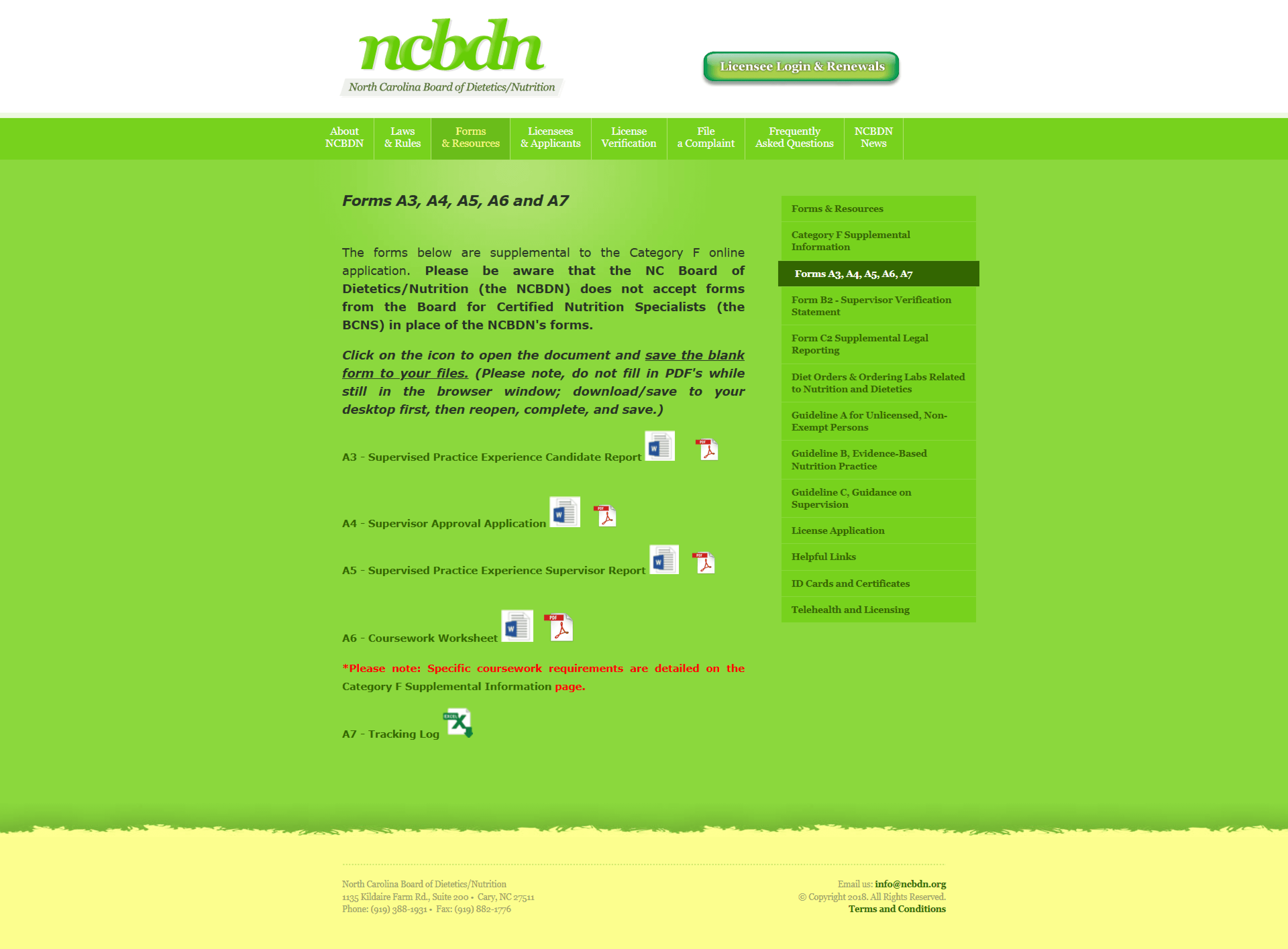

Research & Discovery
— Marnie, Executive Director of the North Carolina Board of Dietetics/Nutrition
Before any design decisions, I needed to understand where users were failing, what their ideal visit to this site would accomplish, and how this varied across unique audiences.
Stakeholder Interviews
In initial discovery sessions with board staff, we found that the most common support contacts they received were from applicants asking which licensure type applied to them, where to find specific forms, and what to do next. They were also the board's most frequent touchpoints with the public, and foundational reasons that people visited their website.
Stakeholder conversations also surfaced important constraints: the site needed to clearly integrate with a third-party vendor for their licensure gateway, and provide instruction for tasks handled there.
Analytics Review
I reviewed GA data from the existing site to identify where users were failing behaviorally and to establish baseline metrics to design against.
Key findings:
High bounce rates on licensure-type pages
(Too) short average session length in the Applicants section
More traffic to application-type pages than the Forms page
These data points became the KPIs I designed against, and the goal became to reduce bounce on licensure type pages, increase session depth in the Applicants section, and reduce traffic to the standalone Forms page by adding related resources to pages.
Heuristic Evaluation
I conducted a systematic audit of the existing site and documented points of friction:
Recognition over recall: Users had to know and recognize the technical names for categories of licensure
Consistency and standards: Layout and types of content varied across pages even if they served similar purposes
Error prevention: Nothing in the navigation, linking or content flow guided users toward a clear starting place
Help and documentation: PDF forms, licensure requirements and FAQs existed but they were pieced out
These data points became the KPIs I designed against, and the goal became to reduce bounce on licensure type pages, increase session depth in the Applicants section, and reduce traffic to the standalone Forms page by adding related resources to pages.
Competitive Research
The NDBDN does not have "competition," per se. They are the one place for North Carolina licensure for dietetics/nutrition. However, I reviewed other state licensing board sites the client recommended as reference points for various reasons including the NC Board of Nursing and the NC Board of Licensed Clinical Mental Health, as well as additional boards I identified independently. This established some baselines for how other government websites organize information and guide users through tasks.
Part of an email to NCDBN, from a practicing dietitian/nutritionist in North Carolina.


Mid-Fidelity Wireframes


Organizing existing pages, content and key actions

New audience-focused navigation
Solutions
Audience Segmentation and Task-Based Navigation
NC Registered/Licensed Dietitians/Nutritionists
→ Renew license or update personal information
Out-of-State Dietetitians/Nutritionists
→ Seeking the ability to practice in NC, and need to apply
→ May be unaware of state licensure compact opportunities
General Public
→ Find or verify a dietitian/nutritionist, file a complaint, or understand their rights
Prospective/Current Applicants
→ Seeking licensure requirements and registration instructions
High School Students/Career Changers
→ Prepare for a future in the field
Insurance Companies
→ May verification licensure for future employees

New navigation menu
Persistent Section Sidenav (and Breadcrumbs)
I added a persistent left sidebar to show all pages in that site section (i.g. all pages that user may need). This directly addresses one of the problems the analytics had flagged, where users are bouncing back and forth trying to figure out where they are and what they need. With the sidebar, users can see where they are and quickly explore the section.

Updated Category B Page

Updated Types of Licensure Page
Reframing Licensure Type Language
The licensure types pages were rewritten to include more descriptive language alongside the regulatory names. The pages now open with plain-language, and all can be viewed from a single, new page including all types of licensure. This helps users course-correct if needed, and easily explore the different types.
This decision came from the stakeholder interviews, which found that differentiating between types of licensure caused confusion and was the board's most common source of support requests.
Context-Related Resources

Updated Types of Licensure Page

Updated Forms & Documents Page

Updated Category F Page
Typographic Hierarchy, Readability, and Content Architecture
I established a consistent page structure for each type of page and laid content for all categorically similar pages out in the same order. The new site has clearly sorted and organized body sections, distinct action points, inline glossary callouts for regulatory jargon, and a related resources section at the bottom. Every page follows the same system, to make information predictable and easy to find.
Regulatory language was a constraint and it could not change much, but this site wasn't intended to be fascinating. The goal was to prioritize readability, and make information easy to find.
Reorganizing content site-wide into consistent pages reduced support emails by 80%.
WCAG 2.1 AA Accessibility
Outcomes
Post-launch analytics and client feedback confirmed improvement across the KPIs identified in discovery. Bounce rate dropped on licensure type pages, session duration increased in the Applicants section, and direct traffic rose to pages related to the board's most common tasks (applying, renewing, verifying a license, and updating personal information) rose. Support email volume decreased 80%.
Board members and the licensure community also noted a shift in how NCBDN presents itself publicly. The regulatory body's visual identity is more credible, and reflective of the diversity in our beautiful state of North Carolina.
(Thank you, Marnie, for disliking images of apples as much as me).
Reflections
Architecture is everything
This project taught me the importance of starting with the most complicated tasks and context first, to build a system that can handle anything you throw its way. And if it can't handle it, it's important to reassess the entire setup. This project needed an adaptable version of a one-size-fits all solution so that pages could feel familiar and easy to navigate but also custom to unique needs.
Accessibility is WCAG, but also Readability
User research showed that the original site was difficult to use, but that wasn't always related to web accessibility standards. A lot of frustration was coming from confusion, misunderstanding, disorganization, and inability to locate important information. This website felt tangled and complicated, but I truly enjoyed uncovering problems and working out a new site strategy that addressed deeper accessibility issues than the RFP included.